MyDesign Documentation

Documentation for the MyDesign System

1. What is MyDesign?

Unveil MyDesign is Unveil Design’s dashboard and data system. MyDesign is your central hub for monitoring your website’s performance, tracking changes, submitting requests, and reaching Unveil Design’s support team. It is accessible via any desktop web browser, and updates in real time.

To login to your MyDesign Dashboard, click the “MyDesign Login” visible at the top of this page. 

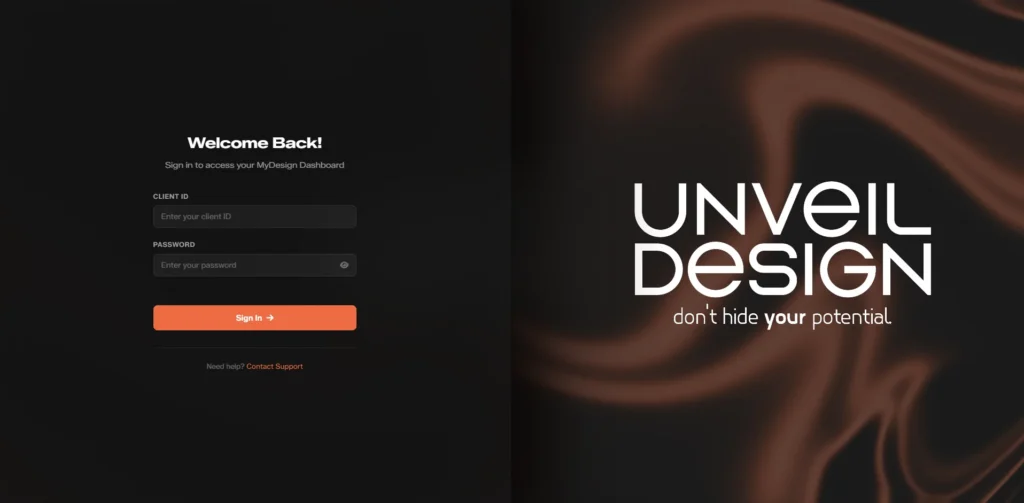
Once you’ve successfully navigated to the MyDesign Login, it should look similar to this:

MyDesign Dashboard Login Screen

You may sign in using your Client ID in the Client ID field, and your given password in the password field.

Your Client ID and password are provided to you by the Unveil Design team via email or written communication. You may request Unveil Design changes your password at any time. If you forget your username and password, reach out to Unveil Design with the provided contact email on file.

Once you’ve logged into your MyDesign Dashboard, it should look similar to this:

Website Statistics Page on MyDesign Dashboard

MyDesign uses a topbar navigation system, which you can see on the left of the page.

The tabs on the topbar are labeled:

  • Website Analytics
  • Website Updates
  • Request a Change
  • Contact Support
  • Billing


Navigating to each individual page is as easy as clicking on the name of the page you’d like to go to on the topbar. The “Logout” button is located in the bottom right of any page. You will automatically be logged out upon closing the webpage.

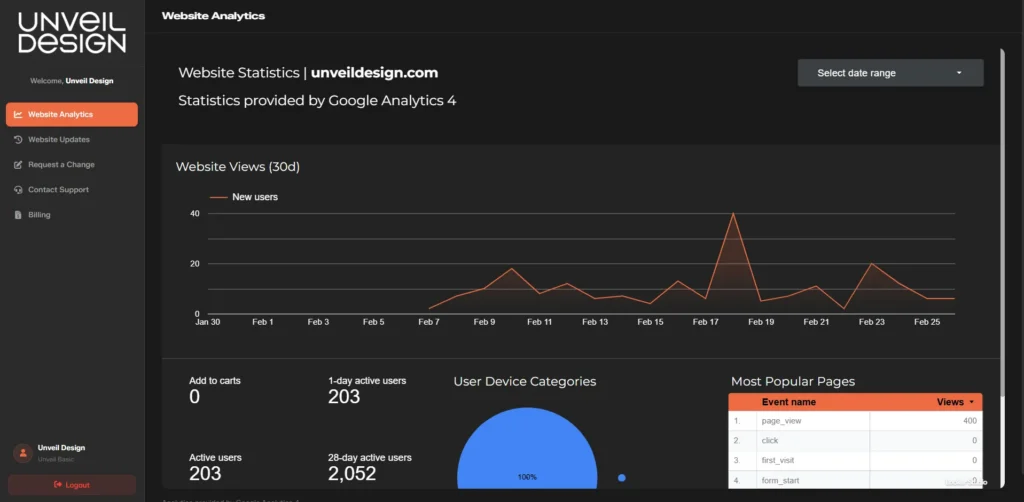
Upon logging into MyDesign, you should be greeted with the Website Analytics page:

Website Statistics Page on MyDesign Dashboard
Dummy statistics are used in demonstration picture.

The Website Analytics page displays live statistics information for your website, powered by Google Analytics 4.

Your Website Statistics is pre-setup with important metrics to follow. You may request Unveil Design show you a particular statistic, and it can be modified by the Unveil Design team.

By default, your Website Analytics shows:

  • Website Views (7d/30d/90d) – Visitors to your site in the last 7/30/90 days
  • Most Popular Pages – Most popular pages of your website
  • User Device Categories – Types of devices visiting your website (desktop, mobile, etc.)
  • Active Users – Current users on your website
  • Bounce Rate – Users who left your website after viewing only 1 page
  • Leads Generated – Leads generated from your website

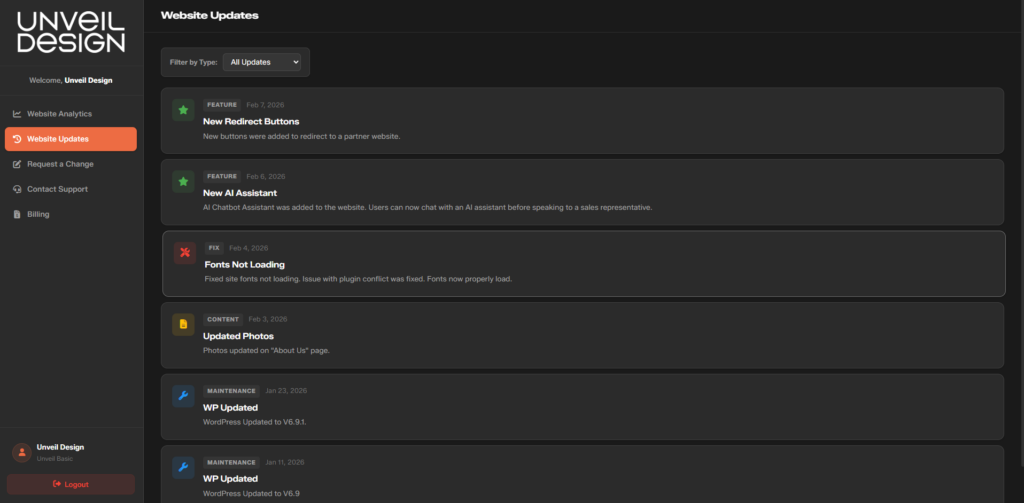
Upon navigating to “Website Updates” in the sidebar, the dashboard will show the “Website Updates” page:

Website Update Page on MyDesign Dashboard

The Website Updates page is a running log of every change made to your website by the Unveil Design team.

At the top of the website updates page, you’ll see a “Filter by Type” selector. This allows you to filter by category of update.

The categories are as follows:

  • Feature – New functionality or addition to your website
  • Fix – Bug fixes and issue resolutions
  • Content – Text, photo, or media updates
  • Maintenance – WordPress Updates, WordPress Plugin Updates, and Core Web Vitals Updates
  • Construction – New construction on your website, such as a new page

Each update entry shows:

  • Update type (Color-coded, Fix = Red, Feature = Green, Content = Yellow, Maintenance = Blue)
  • Date of the update
  • Title and brief description of update

This log provides full transparency into everything that has been changed on your website, and when.

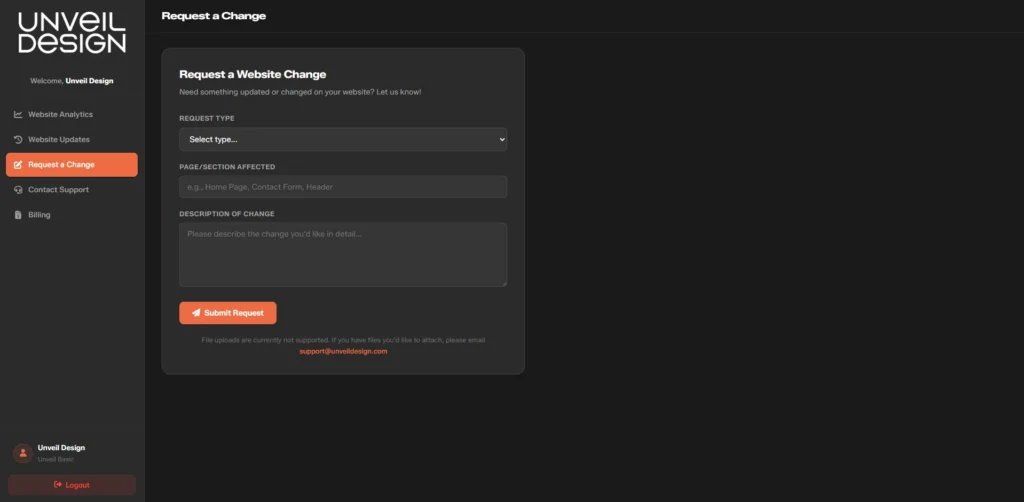
Upon navigating to “Request a Change” in the sidebar, the dashboard will show the “Request a Change” page:

Request a Change page on MyDesign dashboard

The Request a Change page allows you to immediately submit website change requests directly to the Unveil Design team.

The fields on the form are as follows:

  • Request Type – Select the type of change from the dropdown menu
  • Page/Section Affected – Specify which page or area of your website needs to be changed
  • Description of Change – Describe in detail what you’d like to be changed

Once complete, click Submit Request to immediately send your request to our team.

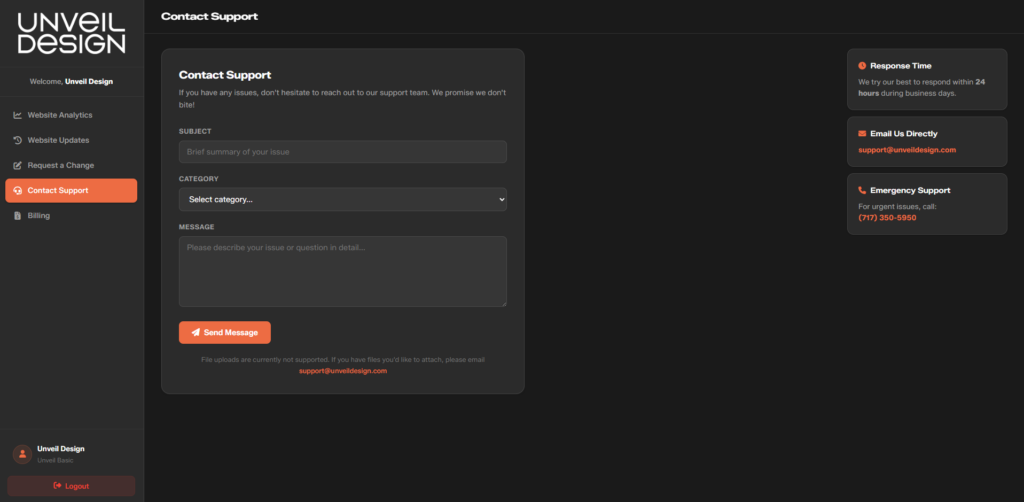
Upon navigating to “Contact Support” in the sidebar, the dashboard will show the “Contact Support” page:

Support page on MyDesign Dashboard

The Contact Support page lets you reach the Unveil Design team for any questions, issues, or urgent matters.

Support Form Fields:

  • Subject – A brief summary of your issue
  • Category – Select the category that best fits your issue from the dropdown menu
  • Message – A detailed description of your issue or question

Once complete, click Submit Message to immediately send your request to our team. We will try our best to get back to you within 24 hours, but responses may take up to 48 hours if our team is under heavy load.

Additional Contact Options:

If you’re currently experiencing an emergency situation, such as a site outage or broken functionality, you may contact Unveil Design at (717) 500-1676.

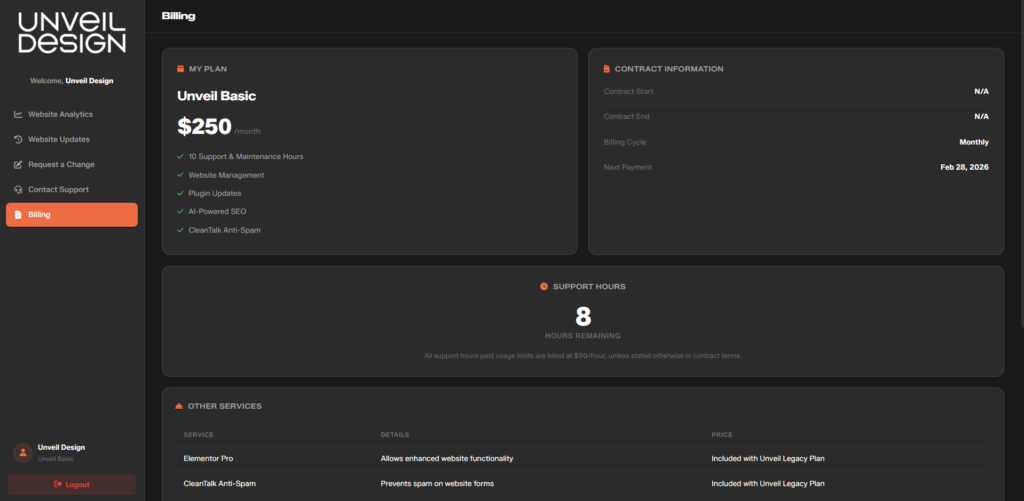
Upon navigating to “Billing” in the sidebar, the dashboard will show the “Billing” page:

Billing page of MyDesign Dashboard
Dummy information is used in demonstration picture.

The Billing page gives you a full overview of your current plan, contract details (if applicable), remaining support hours, and any additional services on your account. There are a few different sections on the Billing page. You can find the purpose of each individual section below.

My Plan
The “My Plan” section displays your current Unveil Design Service Package, monthly cost, and included services. For example, the sample plan at $250/month includes:

  • 10 Support & Maintenance Hours
  • Website Management
  • Plugin updates
  • AI-Powered SEO
  • CleanTalk Anti-Spam

Contract Information
This shows you a summary of your current billing agreement, and if applicable, your contract information. It shows the information as follows:

  • Contract Start / End – These are the dates of your contract term
  • Billing Cycle – How often you’re billed (Monthly, Yearly)
  • Next Payment – When your next payment is due


Support Hours
This section shows how many of your included support hours remain for the billing period. Hours are consumed when the team performs work on your site outside of routine maintenance.

Any support hours used beyond your plan’s limit are billed at $90/hour, unless your contract specifies otherwise.

Other Services
This section lists any add-on services attached to your account, such as our add-on packs, or website-specific services. Some services are included with higher-tier plans, such as Unveil Ultimate including the Marketing Package.

Need Help?

Contact us here.

Contact Form

Our Information

Unveil Design Logo

Welcome to the footer.

Looking for something else? You can probably find it here.

Quality Commitment

Quality remains a core value of Unveil Design. We guarantee that all design work done by Unveil Design is fully human. Generative AI for creative purposes goes against the values of our business, and does not comply with our strict quality standards. Learn about our standard for quality here.

2026 © Unveil Design, LLC. Website made with love by... Unveil Design. <3

MyDesign Documentation

Documentation for the MyDesign System

1. What is MyDesign?

Unveil MyDesign is Unveil Design’s dashboard and data system. MyDesign is your central hub for monitoring your website’s performance, tracking changes, submitting requests, and reaching Unveil Design’s support team. It is accessible via any desktop web browser, and updates in real time.

To login to your MyDesign Dashboard, click the “MyDesign Login” visible at the top of this page. 

Once you’ve successfully navigated to the MyDesign Login, it should look similar to this:

MyDesign Dashboard Login Screen

You may sign in using your Client ID in the Client ID field, and your given password in the password field.

Your Client ID and password are provided to you by the Unveil Design team via email or written communication. You may request Unveil Design changes your password at any time. If you forget your username and password, reach out to Unveil Design with the provided contact email on file.

Once you’ve logged into your MyDesign Dashboard, it should look similar to this:

Website Statistics Page on MyDesign Dashboard

MyDesign uses a sidebar navigation system, which you can see on the left of the page.

The tabs on the sidebar are labeled:

  • Website Analytics
  • Website Updates
  • Request a Change
  • Contact Support
  • Billing


Navigating to each individual page is as easy as clicking on the name of the page you’d like to go to on the sidebar. 

At the bottom of the sidebar, you’ll see your company’s name, and your current Unveil Design Service Pack. Below that is a “Logout” button, allowing you to log out of your MyDesign account.

Upon logging into MyDesign, you should be greeted with the Website Analytics page:

Website Statistics Page on MyDesign Dashboard
Dummy statistics are used in demonstration picture.

The Website Analytics page displays live statistics information for your website, powered by Google Analytics 4.

Your Website Statistics is pre-setup with important metrics to follow. You may request Unveil Design show you a particular statistic, and it can be modified by the Unveil Design team.

By default, your Website Analytics shows:

  • Website Views (30d) – Visitors to your site in the last 30 days
  • Most Popular Pages – Most popular pages of your website
  • User Device Categories – Types of devices visiting your website (desktop, mobile, etc.)
  • Active Users – Current users on your website
  • 30-day Active Users – Active users on your website for the last 30 days
  • Bounce Rate – Users who left your website after viewing only 1 page
  • Engagement Rate – Users who viewed more than 2 pages on your website
  • Leads Generated – Leads generated from your website

Upon navigating to “Website Updates” in the sidebar, the dashboard will show the “Website Updates” page:

Website Update Page on MyDesign Dashboard

The Website Updates page is a running log of every change made to your website by the Unveil Design team.

At the top of the website updates page, you’ll see a “Filter by Type” selector. This allows you to filter by category of update.

The categories are as follows:

  • Feature – New functionality or addition to your website
  • Fix – Bug fixes and issue resolutions
  • Content – Text, photo, or media updates
  • Maintenance – WordPress Updates, WordPress Plugin Updates, and Core Web Vitals Updates

Each update entry shows:

  • Update type (Color-coded, Fix = Red, Feature = Green, Content = Yellow, Maintenance = Blue)
  • Date of the update
  • Title and brief description of update


This log provides full transparency into everything that has been changed on your website, and when.

Upon navigating to “Request a Change” in the sidebar, the dashboard will show the “Request a Change” page:

Request a Change page on MyDesign dashboard

The Request a Change page allows you to immediately submit website change requests directly to the Unveil Design team.

The fields on the form are as follows:

  • Request Type – Select the type of change from the dropdown menu
  • Page/Section Affected – Specify which page or area of your website needs to be changed
  • Description of Change – Describe in detail what you’d like to be changed


Once complete, click Submit Request to immediately send your request to our team.

File uploads are not currently supported by MyDesign Version 1.0. If you need to attach files, please email them directly to support@unveildesign.com.

Upon navigating to “Contact Support” in the sidebar, the dashboard will show the “Contact Support” page:

Support page on MyDesign Dashboard

The Contact Support page lets you reach the Unveil Design team for any questions, issues, or urgent matters.

Support Form Fields:

  • Subject – A brief summary of your issue
  • Category – Select the category that best fits your issue from the dropdown menu
  • Message – A detailed description of your issue or question

Once complete, click Submit Message to immediately send your request to our team. We will try our best to get back to you within 24 hours, but responses may take up to 48 hours if our team is under heavy load.

Additional Contact Options:

If you’re currently experiencing an emergency situation, such as a site outage or broken functionality, you may contact Unveil Design at (717) 500-1676.

Upon navigating to “Billing” in the sidebar, the dashboard will show the “Billing” page:

Billing page of MyDesign Dashboard
Dummy information is used in demonstration picture.

The Billing page gives you a full overview of your current plan, contract details (if applicable), remaining support hours, and any additional services on your account. There are a few different sections on the Billing page. You can find the purpose of each individual section below.

My Plan
The “My Plan” section displays your current Unveil Design Service Package, monthly cost, and included services. For example, the sample plan at $250/month includes:

  • 10 Support & Maintenance Hours
  • Website Management
  • Plugin updates
  • AI-Powered SEO
  • CleanTalk Anti-Spam

Contract Information
This shows you a summary of your current billing agreement, and if applicable, your contract information. It shows the information as follows:

  • Contract Start / End – These are the dates of your contract term
  • Billing Cycle – How often you’re billed (Monthly, Yearly)
  • Next Payment – When your next payment is due


Support Hours
This section shows how many of your included support hours remain for the billing period. Hours are consumed when the team performs work on your site outside of routine maintenance.

Any support hours used beyond your plan’s limit are billed at $90/hour, unless your contract specifies otherwise.

Other Services
This section lists any add-on services attached to your account, such as our add-on packs, or website-specific services. Some services are included with higher-tier plans, such as Unveil Ultimate including the Marketing Package.

Contact Us

Here's where you can find us.

Contact Form

Our Information

Unveil Design Logo

Welcome to the footer.

Looking for something else? You can probably find it here.

Quality Commitment

Quality remains a core value of Unveil Design. We guarantee that all design work done by Unveil Design is fully human. Generative AI for creative purposes goes against the values of our business, and does not comply with our strict quality standards. Learn about our standard for quality here.

2026 © Unveil Design, LLC. Website made with love by... Unveil Design. <3